Why would you be interested in this Dorico project template? Read on!
If you haven’t seen the news (as of August 2024), the FinaleMusic team is sunsetting their music notation application. Don’t worry; it’ll work properly for a while yet. They just aren’t going to make more updates, and at some point will also end tech support. As I write this, a rather mad panic has emerged in the part of the handbell composing community that’s been using Finale.
SmartMusic, Finale’s creator, has done all they can to avoid leaving us high and dry. They’ve pointed us toward Dorico, a more recent addition to the group of music notation applications. That’s where I’ve headed, and I find myself quite favorably impressed. Granted, it involves learning a new interface, new commands, and a new way of looking at composing. But I’m convinced that the Dorico approach works. (Four months later, January 2025: Yes, it does!)
My first major experiment was to to make a manual copy of an existing score in Dorico. Armed with a laminated copy of the Dorico Reference Card (and I DO recommend laminating it, because you’ll find it quite useful), I started slowly, but accelerated as I learned.
There have been requests for Dorico to add handbell notation elements to the application. As of Dorico Pro 6.0, that hasn’t happened (yet). So I’ve started with a standard Dorico project and added some of the standard handbell articulations. They’re in the set of Common Playing Techniques, and work just like the huge number of other playing techniques in Dorico.
If you’re interested in trying my Dorico template file, you’re can download it from here. Just click on “Download”. Let me know what you think!
Download Version 1
Download Version 2 (ZIP file)
Change Log
- 2024-09-05: Fixed notation errors in BUC.
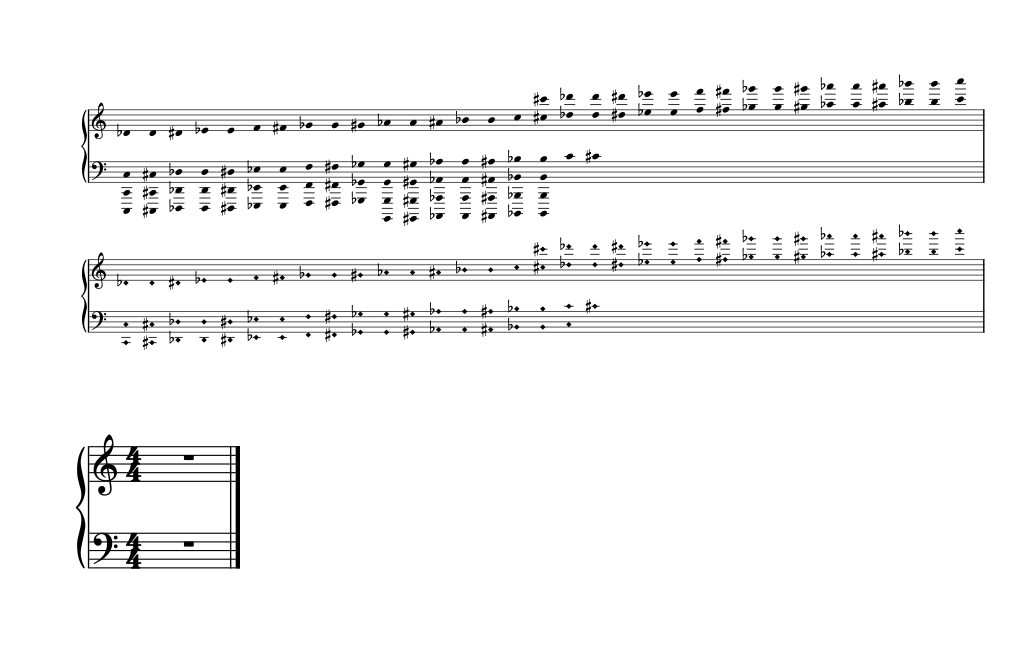
- 2024-09-03: Added Bells Used Chart and Chimes Used Chart.
- These brute force additions contain the full production range of bells and chimes, so you should only need to delete the notes not in your score. For scores with a relatively small range, you’ll save time by deleting the contents of each relevant chart and entering the notes by hand.
- The two bars in these charts are open meter (no defined time signature), so you can just enter notes without having to worry about overflowing the bars. There appears to be a limitation with respect to how many quarter notes you can add to an open meter bar, so I recommend using sixteenth notes for your BUC (you can hide the stems and beams later).
I haven’t found a way to add single parentheses to noteheads for denoting the enharmonics in these two charts. For the time being, you may have to rely on the musicianship of the ringers to identify shared bells.- Because each of these charts exists as a separate Dorico flow, you can remove one or the other as need dictates. Or you can just go into Setup mode and take them out of your layouts.
- 2025-01-25: It turns out that adding parentheses for BUC enharmonics is quite easy. Just add text elements to the appropriate notes (a left parenthesis to D#5, and a right parenthesis to Eb5, for instance). Then go to Engrave mode and drag them to where they need to be. Note, however, that if your project has multiple versions of the same score, you’ll have to engrave each one separately.
- 2026-07-11: Version 2: Made some adjustments to put the BUC and CUC in their own frame. This allows the composer/arranger to adjust the width of the BUC and CUC by changing the dimensions of the frame in which they’re displayed.